
Dependency-aware planning
Tasks can be linked to required predecessors so start dates are based on real sequence, not guesswork.
Features · Scheduling
You stay in control of when work should start, while Harnzer predicts realistic task dates using dependencies, team availability, and outstanding work.
Define your project logic once, then let the system continuously suggest when each task should start and finish.
The scheduler evaluates each task in context. It checks what must be completed first, who is available to do the work, and what else is still in progress before proposing start and end dates.
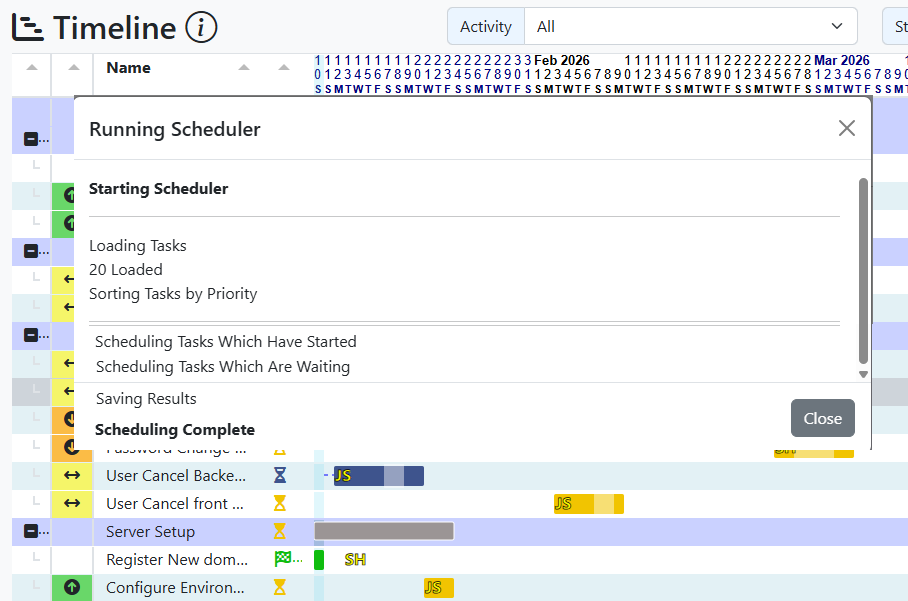
Tasks can be linked to required predecessors so start dates are based on real sequence, not guesswork.
Assignments and team capacity are included in the calculation, helping avoid impossible overlaps.
Harnzer proposes dates for each task and keeps those dates coherent as project conditions change.
Users can still set or adjust dates directly. Automation supports planners; it does not replace judgement.
Step 1
Define constraints, dependencies, priorities, and assignment intent directly in task management.
Step 2
Scheduler status feedback confirms whether tasks were placed as expected and highlights where attention is needed.
Step 3
Move straight to timeline visualisations with confidence that dates reflect current project reality.
Explore related views or open a trial to try scheduling with your own tasks.