
Stage-based visibility
View all tasks by workflow step to understand current delivery position instantly.
Features · Kanban
Kanban shows work by stage, making it easy to understand progress, rebalance workload, and keep delivery moving.
Track every task through your process with drag-and-drop simplicity.
Each column represents a stage of delivery, so everyone can see what is queued, in progress, and complete in real time.
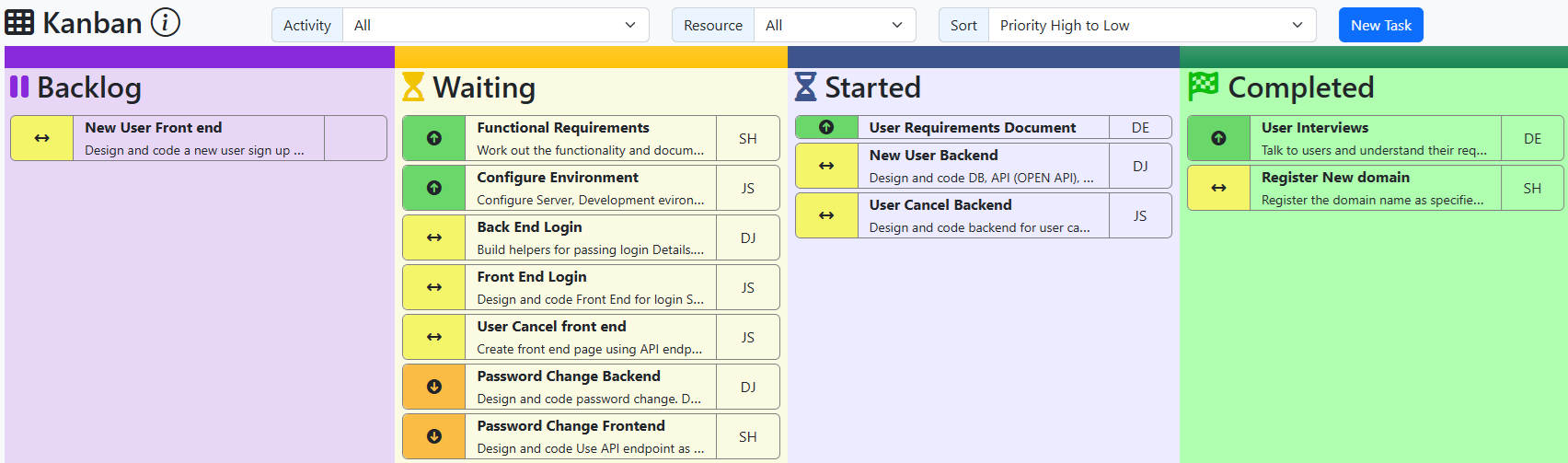
View all tasks by workflow step to understand current delivery position instantly.
Update status quickly as work progresses so the board always reflects reality.
Identify stages where tasks accumulate and take action before delays spread.
Use the board as a shared reference for concise, outcome-focused team updates.
Step 1
Represent your real workflow so status is meaningful to the whole team.
Step 2
Keep the board current by updating cards as soon as work changes state.
Step 3
Act on blocked or overloaded stages to maintain smooth, predictable delivery.
Explore planning and reporting views to connect Kanban flow with project outcomes.